Service Demo Video
Carbon Emission Management Software
1. Software Overview
1.1 Software Introduction
Carbon Emission Management Software is a professional energy and carbon management and control system designed for industrial enterprises, energy plants, and group enterprises. It has been developed in strict compliance with the Guidelines for Accounting Methods and Reporting of Corporate Greenhouse Gas Emissions and the compliance requirements of the national carbon market. The software delivers full-process digital management across automatic collection of enterprise energy consumption and carbon emission data, intelligent accounting, carbon asset management, emission reduction analysis, automated report generation, and compliance delivery. It meets business requirements including carbon verification, carbon market compliance, ESG disclosure, and enterprise energy-saving and carbon-reduction assessments, and is applicable to a wide range of energy and industrial scenarios such as thermal power, photovoltaic, energy storage, coal, chemical, and industrial parks.
1.2 Core Functions
The software centers on six core modules: data collection management, greenhouse gas MRV (Measurement, Reporting and Verification) accounting, carbon asset compliance management, emission reduction data analysis, compliance report output, and system permission control. It supports multi-level, hierarchical management across group, subsidiary, plant, and unit, enabling carbon emission data to be monitored, reported, and verified.
1.3 Operating Environment
- Client side: Windows 10/11, macOS and later; compatible with Chrome, Edge, and 360 Extreme Explorer (latest versions).
- Server side: supports on-premises deployment and cloud SaaS deployment; compatible with domestic Xinchuang servers and databases.
- Network requirements: enterprise intranet or public network environment, ensuring connectivity with plant DCS, SCADA, CEMS, energy metering devices, and enterprise ERP and MES systems.
2. Login and Initial Setup
2.1 System Login
- Open a browser, enter the access address of the software system, and go to the system login page.
- Enter the account and password assigned by the enterprise, complete the slider verification, and click [Login].
- On first login, changing the initial password is mandatory. It is recommended that the password be a combination of letters, numbers, and special symbols to enhance account security.
2.2 Basic Information Initialization (Administrator Operations)
Basic configuration must be completed before the system is first used, providing the foundation for subsequent carbon accounting and data statistics:
- Organizational structure configuration: go to [System Settings] - [Organization Management], enter hierarchical information such as group, subsidiary, plant, and production unit to build the enterprise organizational structure tree.
- Emission boundary configuration: go to [Carbon Basic Settings] - [Emission Boundary Management], add emission units based on the enterprise operating boundary, and bind production equipment and energy consumption points.
- Factor library configuration: the system is pre-loaded with official national accounting factors and IPCC factors by default; administrators can customize calorific values and emission factors based on the enterprise's measured data.
- User permission assignment: go to [User Management] to add regular user, verification user, and administrator accounts, and assign differentiated permissions such as data reporting, accounting review, and report export.
3. Core Functionality Operations Guide
3.1 Data Collection and Reporting Management
This module forms the foundation of carbon accounting and is responsible for collecting raw data on enterprise energy consumption, fuel, and carbon emissions, supporting both automatic collection and manual reporting.
3.1.1 Automatic Data Collection
The system automatically connects to plant smart electricity meters, gas meters, CEMS flue gas monitoring systems, DCS/SCADA production systems, and ERP fuel storage systems, and automatically captures the following data: purchased electricity/heat consumption, coal/natural gas/fuel oil consumption, real-time flue gas carbon emission data, and production operation data. Collected data is automatically stored in the system with full audit trails and requires no manual intervention.
3.1.2 Manual Data Reporting
For scenarios without automatic collection devices, manual reporting of Scope 1/Scope 2/Scope 3 related data is supported:
- Go to [Data Management] - [Manual Reporting], and select the reporting plant and reporting period (day/month/quarter/year).
- Enter data such as fuel consumption, vehicle fuel usage, employee business travel, and raw material transport, and upload supporting attachments such as weighbridge tickets, invoices, and test reports.
- After submission, data awaits administrator review; once approved, the data takes effect and is included in carbon accounting statistics.
3.1.3 Data Validation and Anomaly Handling
The system automatically validates collected and reported data, and issues automatic alerts for missing data, abnormal values, and excessive year-on-year or period-over-period fluctuations. Users can enter the [Data Alerts] module to view the anomaly list, verify and correct the data, and record reasons, ensuring the authenticity and compliance of data.
3.2 Greenhouse Gas (GHG) MRV Accounting Management
As the core function of the system, this module automatically completes comprehensive carbon emission accounting for the enterprise and meets the MRV compliance requirements of carbon verification.
3.2.1 Accounting Scope
- Scope 1 (direct emissions): accounts for carbon emissions from combustion by the enterprise's own equipment, production processes, and equipment fugitive emissions.
- Scope 2 (indirect emissions): accounts for indirect carbon emissions from purchased electricity and heat.
- Scope 3 (other indirect emissions): optionally accounts for whole-chain carbon emissions including raw material transport, product distribution, employee business travel, and waste treatment.
3.2.2 Automatic Accounting Operations
- Go to [Carbon Accounting] - [GHG Accounting], and select the accounting entity and accounting period.
- Click [One-click Accounting], and the system automatically applies official accounting formulas and the factor library to complete the calculation of total carbon emissions and emission intensity.
- After accounting is completed, detailed data can be viewed, including activity data, factor parameters, calculation processes, and final emission amounts.
3.2.3 Export of Accounting Working Papers
After accounting is completed, the system supports one-click export of the complete set of carbon verification working papers, including the fuel ledger, energy consumption ledger, emission calculation sheets, and data traceability records, which can be directly used for third-party carbon verification and data reporting to the Ministry of Ecology and Environment.
3.3 Carbon Asset and Compliance Management (for Emission-Controlled Enterprises)
For emission-controlled enterprises included in the national carbon market, the system enables full-process digital management of carbon allowances, CCER (China Certified Emission Reduction), and annual compliance.
3.3.1 Carbon Allowance Ledger Management
Go to [Carbon Asset Control] - [Allowance Management] to enter annual free allowances and auctioned allowance data. The system automatically calculates allowance holdings, amounts used, and remaining balances, and displays the enterprise's allowance surplus/deficit status in real time.
3.3.2 CCER Project Management
The system supports entering information on emission reduction projects such as photovoltaic, wind power, and forestry carbon sinks, registering CCER emission reduction volumes, validity periods, and offset ratios, and automatically calculating the emission reduction credits available for compliance.
3.3.3 Annual Compliance and Alerts
Based on annual carbon emission data, the system automatically calculates the allowances required for compliance and issues pop-up alerts for situations such as allowance deficits and approaching compliance deadlines. Users can simulate compliance plans online, calculate the cost differences between CCER offsetting and allowance procurement, and complete the online compliance process registration.
3.4 Data Analysis and Emission Reduction Simulation
3.4.1 Visual Data Dashboard
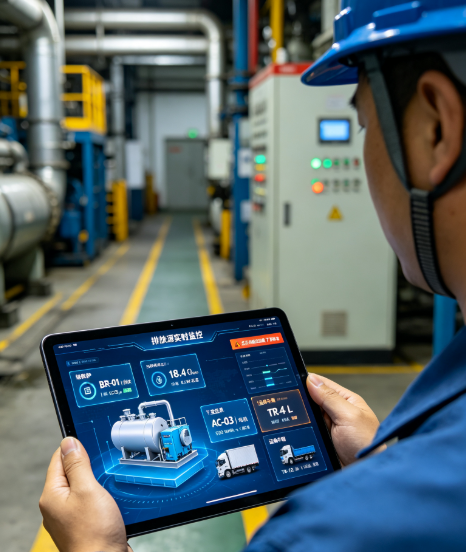
The system homepage integrates a carbon and energy big data dashboard that displays in real time the enterprise's total carbon emissions, carbon emission intensity per unit of output, emission share by plant/equipment, historical emission trends, and energy-carbon benchmarking data, intuitively presenting the enterprise's current decarbonization status.
3.4.2 Emission Reduction Scenario Simulation
In the [Emission Reduction Analysis] module, multiple decarbonization options can be simulated: purchasing green electricity, fuel substitution, equipment energy-saving retrofitting, and CCUS carbon capture retrofits. The system automatically calculates the emission reduction volumes, decarbonization costs, and return on investment for different options, providing data support for the enterprise's decarbonization decisions.
3.4.3 Indicator Assessment Decomposition
Administrators can enter the enterprise's annual decarbonization targets. The system automatically decomposes the total carbon emission and intensity indicators to each subsidiary and plant, tracks target completion rates in real time, and supports the export of performance assessment data.
3.5 Compliance Reporting and Disclosure Management
The system supports one-click generation of various compliance reports, addressing the cumbersome manual report compilation and data accuracy issues:
- Annual carbon emission report: adapted to the national carbon market reporting format and directly usable for filing on the Ministry of Ecology and Environment platform.
- Carbon inventory report: automatically generates a comprehensive annual enterprise carbon inventory report, including accounting boundaries, data sources, accounting results, and emission reduction recommendations.
- ESG/TCFD disclosure reports: outputs ESG sustainability reports and carbon information disclosure materials adapted for listed companies and group enterprises.
Custom reports: supports user-defined filter conditions to export monthly and quarterly energy consumption and carbon emission statistics reports.
Specifications
Key Features
- 1. Compliance Foundation: Developed in alignment with the Corporate Greenhouse Gas Emission Accounting Guidelines and national carbon market rules, meeting compliance requirements for carbon verification, carbon performance, ESG disclosure, and energy conservation & carbon reduction assessment.
- 2. Intelligent Data Accounting: Supports automatic collection of energy consumption and carbon emission data, performs intelligent carbon emission accounting, and automatically generates carbon-related reports.
- 3. Full-Link Carbon Management: Covers carbon asset control, emission reduction analysis and compliance performance, realizing digital management of the entire energy and carbon business workflow.
- 4. Multi-Scenario Adaptation: Designed for industrial enterprises, energy plants and group corporations, applicable to energy and industrial scenarios including thermal power, photovoltaics, energy storage, coal, chemical industry and industrial parks.