Service Demo Video
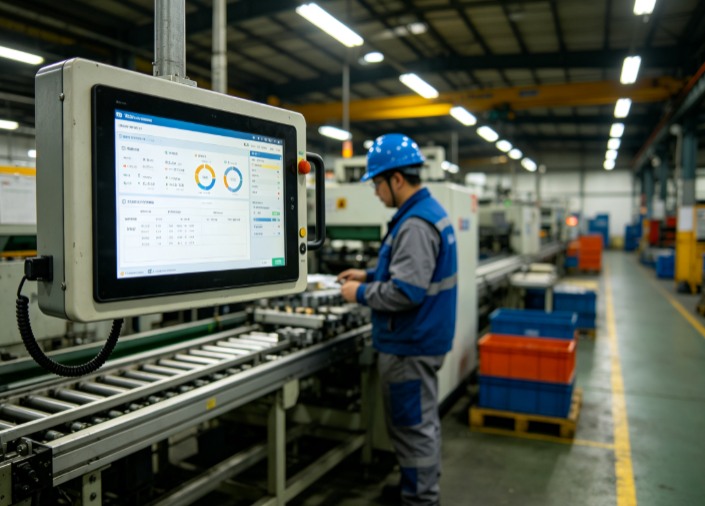
MES Manufacturing Execution System
1. Document Overview
1.1 Document Purpose
This document is the standard function user manual of the MES Manufacturing Execution System. It is intended to help enterprise management personnel, workshop operators, equipment administrators, quality inspectors, and operation and maintenance personnel gain a full understanding of the system architecture, core functions, operation procedures, parameter configuration, and exception handling methods. It standardizes the daily operation standards of the system, mitigates the risk of misoperation, and ensures the digitalized, transparent, and standardized implementation of production processes, providing complete operational references for production scheduling, quality control, equipment maintenance, material traceability, and data analysis.
1.2 Scope of Application
This manual applies to MES system end users, system administrators, implementation and maintenance personnel, and enterprise production management personnel in the discrete manufacturing and process manufacturing industries (including machining, electronic assembly, automotive parts, hardware, plastics, and food processing). It covers the full range of usage scenarios in daily system operation, parameter configuration, permission management, fault self-check, and data statistics.
1.3 System Overview
The MES Manufacturing Execution System is a workshop-level production management system located between the enterprise-level ERP system and the underlying equipment automation control systems (PLC/SCADA). Its core functions include real-time production process control, full material traceability, equipment status monitoring, full-process quality inspection, labor time data collection, production exception early warning, and automatic report statistics. It bridges the data gap between the enterprise planning layer and the execution layer, and realizes full-lifecycle digitalized management of production orders from release, scheduling, production start, processing, inspection, warehousing, to completion and archiving.
2. System Function Operation Flows
The MES system consists of twelve core modules: Basic Data Management, Production Order Management, Production Scheduling Management, Workshop Execution Management, Material Management, Quality Management, Equipment Management, Labor Time Management, Exception Management, Kanban Management, Report Statistics, and System Management. The detailed functions and operation steps of each module are described below.
2.1 Basic Data Management Module (System Core Foundation)
This module provides basic data support for all business operations of the system. All data must be maintained in advance; otherwise, production business cannot proceed normally. It is a mandatory module for system initialization.
2.1.1 Material Information Management
Function Description: Maintains the material master data of all raw materials, semi-finished products, finished products, and auxiliary materials of the enterprise, and realizes unique code-based material control.
Operation Steps: [Basic Data] → [Material Management] → [Material Master] → [New] → enter the material code, material name, specification/model, material type, unit of measure, material, safety stock, procurement lead time, production cycle, and remarks → [Save].
Supported Functions: material classification management, batch import and export of materials, material information editing, material deactivation/activation, and material-to-process-recipe association.
2.1.2 Process Routing Management
Function Description: Defines the product production and processing flow, and sets the operation sequence, operation parameters, standard labor time, required equipment, operators, and inspection standards. It serves as the core basis for production execution.
Operation Steps: [Basic Data] → [Process Management] → [Process Routing] → [New] → select the corresponding product material → add operations in sequence, sort them, and set the standard labor time, equipment, work instructions, and inspection requirements for each operation → [Save & Submit].
Supported Functions: process version management (switching between old and new processes), process duplication, process-to-product binding, customizable operation parameters, and upload and preview of work instructions.
2.1.3 Operation Management
Function Description: Maintains the master data of all production operations in the workshop, including parameters such as operation name, operation code, owning workshop, operation type, whether it is an inspection operation, and whether it is a work reporting operation.
2.1.4 Workshop / Workstation / Equipment Management
Function Description: Maintains the workshop organizational structure, production workstations, and equipment master data, and binds the correspondence between workstations, equipment, and operations, enabling precise control of production points.
2.1.5 Employee Records Management
Function Description: Maintains the records of workshop operators, quality inspectors, and management personnel, and binds employee accounts, positions, permissions, and owning workshops for use in work reporting, labor time statistics, and responsibility traceability.
2.2 Production Order Management Module
This module receives production orders from the ERP system and realizes full-process management of order import, review, splitting, change, closure, and archiving. It serves as the source of production execution.
2.2.1 Order Import / Creation
1. Automatic synchronization: the system is integrated with the ERP system and synchronizes released production orders with one click.
2. Manual creation: manually enter the order number, product, production quantity, delivery date, production workshop, priority, and other information.
2.2.2 Order Review
Production management personnel review the order information, process, delivery date, and quantity. Orders that pass the review proceed to the scheduling stage; rejected orders can be modified and resubmitted.
2.2.3 Order Change and Termination
Supports production quantity adjustment, delivery date change, product specification change, order suspension, and order termination. All changes are automatically logged, and the change records, change personnel, and change time are fully traceable.
2.2.4 Order Completion and Archiving
After all production, inspection, and warehousing of an order are completed, the system automatically determines that the order is complete, and administrators can archive it manually. Once archived, the order data is locked and cannot be modified arbitrarily, for subsequent data statistics and traceability.
2.3 Production Scheduling Management Module
Based on order delivery dates, equipment capacity, staffing, and material inventory, it realizes intelligent scheduling and manual fine-tuning, addressing the problems of chaotic production scheduling, capacity waste, and delivery delays.
2.3.1 Intelligent Scheduling
Based on order priority, delivery dates, equipment load, operation constraints, and material arrival status, the system automatically generates daily/per-shift production schedules and precisely assigns them to the corresponding workshops, equipment, and workstations.
2.3.2 Manual Scheduling Adjustment
Supports manual adjustment of schedules by management personnel, including dragging to modify production time periods, swapping the production order of orders, pausing schedules, and adding ad-hoc production tasks.
2.3.3 Schedule Dispatch
After the schedule is reviewed and approved, it is dispatched to workshop terminals and electronic kanban boards with one click, so that workshop personnel can view the day's production tasks in real time.
2.3.4 Schedule Tracking
Displays in real time the schedule completion rate, delayed tasks, unscheduled orders, and equipment load saturation, assisting management personnel in adjusting production plans.
2.4 Workshop Execution Management Module (Core Execution Module)
Covers the entire execution process in the workshop, from production start, work reporting, and operation flow to completion and warehousing. It is the core module for MES system implementation and realizes real-time collection of production process data.
2.4.1 Production Start
Workshop operators log in to the workstation terminal and receive the scheduled tasks, verifying the product, quantity, and process requirements. By scanning the code or clicking [Start], the system automatically records the start time, operator, and equipment information, and generates a production flow batch number.
2.4.2 Operation Reporting
After each operation is completed, the operator submits work reporting data, filling in the good quantity, defective quantity, scrapped quantity, and operation duration. Quick reporting by code scanning and batch reporting are supported. Work reporting data is uploaded to the system in real time, and the order production progress is updated automatically. Note: the reported quantity must not exceed the planned quantity, and defective products must be bound to defect reasons; otherwise, the submission cannot be completed.
2.4.3 Operation Flow
After the previous operation is reported and passes inspection, the work automatically flows to the next operation. The system locks the operation flow records, preventing skipped or omitted operations.
2.4.4 Production Completion
After all operations are completed, the operator submits a completion application. Upon review and approval by management personnel, the order status is updated to [Pending Warehousing], and the total production labor time, good product rate, and scrap rate are automatically calculated.
2.5 Material Management Module
Realizes production material requisition, return, replenishment, material traceability, and material inventory control, preventing material waste, production stoppages caused by material shortages, and material mixing.
2.5.1 Production Material Requisition
Based on the BOM (Bill of Materials) of the production order, the system automatically generates a material requisition list. Workshop personnel submit the requisition application; after review by the warehouse, materials are issued, scanned out of stock, and the inventory is automatically deducted. Requisition by order, batch requisition, and on-demand requisition are supported.
2.5.2 Material Return
Surplus production materials can be returned by submitting a return application with the return reason and material status. After review, the materials are returned to the warehouse, and the inventory is automatically replenished.
2.5.3 Material Replenishment
When materials become insufficient due to scrappage or loss, a replenishment application can be submitted. Upon approval, the materials are reissued, and the replenishment details are recorded throughout the process.
2.5.4 Material Traceability
Through the product batch number and order number, the material batches used, suppliers, requisition time, and operators can be traced forward; conversely, the production orders and finished product flows corresponding to materials can be traced backward, realizing full-chain material traceability.
2.6 Quality Management Module
Covers incoming material inspection, in-process inspection, final product inspection, nonconforming product handling, and quality data analysis, realizing full-process quality control of production.
2.6.1 Incoming Quality Control (IQC)
After raw materials arrive, quality inspectors carry out inspections in accordance with the inspection standards, and record the inspection data, good quantity, defective quantity, and defect issues, and determine the inspection result (conforming / nonconforming / conditional acceptance). Only conforming materials can be warehoused and put into production.
2.6.2 In-Process Quality Control (IPQC)
After key operations are completed, quality inspectors conduct patrol inspection, first-article inspection, and last-article inspection, and record the inspection results. Nonconforming operations are prohibited from flowing to the next operation, forcibly intercepting defective products.
2.6.3 Final Quality Control (FQC)
After all operations of a product are completed, a full-item final inspection of the product is carried out. The inspection parameters, appearance, and performance test results are recorded to determine whether the finished product is conforming. Conforming products are permitted to be warehoused, while nonconforming products are transferred to the nonconforming product handling process.
2.6.4 Nonconforming Product Management
Records the nonconforming product batch, defect location, defect reason, responsible workstation, and responsible personnel. Supports repair, rework, and scrapping of nonconforming products, tracks the handling progress throughout, and automatically generates statistics on the TOP defect issues by defect rate.
2.7 Equipment Management Module
Realizes full-lifecycle management covering equipment records, equipment routine inspection, equipment preventive maintenance, equipment repair, equipment status monitoring, and equipment capacity statistics.
2.7.1 Equipment Records
Enter basic information such as equipment number, equipment name, model/specification, purchase date, maintenance cycle, responsible person, and equipment parameters to establish electronic equipment files.
2.7.2 Equipment Routine Inspection
The system presets inspection plans (daily / weekly / monthly). Operators submit inspection records on the terminal every day, and abnormal inspection results trigger automatic alerts to remind personnel to handle them.
2.7.3 Equipment Preventive Maintenance
The system automatically generates maintenance tasks based on the equipment maintenance cycle, reminds maintenance personnel to complete the maintenance work, and records the maintenance content, time, personnel, and consumables to form a maintenance ledger.
2.7.4 Equipment Repair
In the event of equipment failure, operators submit a repair request noting the fault symptoms and fault time. Repair personnel accept the request and carry out the repair, recording the repair process, repair result, and completion time. Statistics on equipment downtime and failure rate are generated.
2.7.5 Equipment Status Monitoring
Displays equipment status in real time, including running, standby, faulty, and stopped states, and generates statistics on the equipment startup rate, utilization rate, and effective capacity, providing data support for equipment optimization.
2.8 Labor Time Management Module
Accurately collects employee production labor time, operation labor time, standby labor time, and overtime labor time, replacing traditional paper-based attendance and work reporting. It is used for payroll calculation, capacity analysis, and efficiency optimization.
2.8.1 Real-time Labor Time Collection
Based on the records of employee production start, completion, standby, and stoppage, the system automatically calculates the effective production labor time without manual statistics.
2.8.2 Labor Time Verification and Adjustment
Management personnel can view the labor time details of employees, and verify and fine-tune abnormal labor time to ensure the accuracy of labor time data.
2.8.3 Labor Time Reports
Automatically generates reports on individual labor time, team labor time, operation labor time, and order labor time, supporting export and integration with the payroll system.
2.9 Production Exception Management Module
Targeting problems during production such as material shortage, equipment failure, personnel absence, process abnormality, quality abnormality, and delivery date abnormality, it realizes exception reporting, dispatching, handling, and closed-loop tracking.
2.9.1 Exception Reporting
When workshop personnel identify a production exception, they report it with one click on the terminal, select the exception type, fill in the exception description, and upload image evidence. The system automatically pushes alerts to the corresponding responsible persons.
2.9.2 Exception Handling
The responsible person receives the exception ticket, handles it promptly, and records the handling plan and handling result to complete the exception closed loop.
2.9.3 Exception Statistics and Analysis
The system automatically compiles statistics on the occurrence frequency of each type of exception, downtime, and impacted capacity, and generates exception analysis reports to help enterprises optimize production management weaknesses.
2.10 Electronic Kanban Management Module
Visualizes the real-time production data of the workshop and supports synchronized display on workshop large screens, computers, and mobile phones, achieving production status transparency. Core kanban display content: order production progress, daily output, good product rate, scrap rate, equipment status, exception tickets, employee capacity, delivery date alerts, and team efficiency. Customizable kanban templates, on-demand configuration of displayed data, and automatic data refresh (every 10 seconds) are supported.
2.11 Report Statistics Module
The system is equipped with dozens of standard production reports, supports custom report configuration, and automatically generates data without manual compilation. Core reports include: production progress reports, capacity and output reports, quality defect reports, equipment utilization rate reports, labor time statistics reports, material consumption reports, exception statistics reports, order delivery reports, and traceability reports. All reports support filtering, export, printing, and visual display in line charts / bar charts, and support statistics by day / week / month / year.
2.12 System Management Module (Administrator Only)
2.12.1 Account and Permission Management
Supports creating, editing, and disabling user accounts, and assigning permissions based on roles (super administrator, production administrator, quality inspector, equipment administrator, and workshop operator), precisely controlling the operational permissions of each role to achieve separation of duties and powers.
2.12.2 Menu Permission Configuration
Customizes the system menus that each role can view and operate, and prohibits ordinary operators from viewing the core configuration, data deletion, and system parameter pages.
2.12.3 Data Dictionary Configuration
Customizes all dropdown options and parameter types of the system (defect reasons, exception types, equipment status, order status, etc.) to accommodate the personalized management needs of the enterprise.
2.12.4 Operation Log Management
Records all user operations throughout the process, including login, creation, editing, deletion, export, and review, and records the operator, operation time, operation content, and IP address, supporting log traceability and abnormal operation investigation.
2.12.5 System Parameter Settings
Configures general system rules, such as work reporting precision, inventory alert thresholds, delivery date alert lead days, password rules, and automatic backup cycles.
3. Overall System Business Flow
Basic data maintenance → ERP order synchronization / manual order creation → order review → intelligent scheduling + schedule dispatch → the workshop receives tasks and starts production → operation production + real-time work reporting → operation inspection and flow → final product inspection → completion and warehousing → data statistics and analysis → order archiving.
المواصفات
الميزات الرئيسية
- 1. Wide audience coverage: Targeting enterprise managers, workshop operators, quality inspectors, maintenance personnel and staff in other positions. It adapts to users from multiple industries including discrete manufacturing and process manufacturing, covering end users, administrators, implementers and personnel related to production management.
- 2. Complete content system: It covers full-process content such as system architecture, function operation, process specifications, parameter configuration, exception handling, permission management, fault self-inspection and data statistics, and provides a complete set of operation guidelines.
- 3. Clear goal orientation: It is used to standardize system operation standards, reduce misoperations, and support the implementation of digital, transparent and standardized production.
- 4. Comprehensive business support: It can provide reliable operation basis for core production businesses such as production scheduling, quality control, equipment maintenance, material traceability and data analysis.