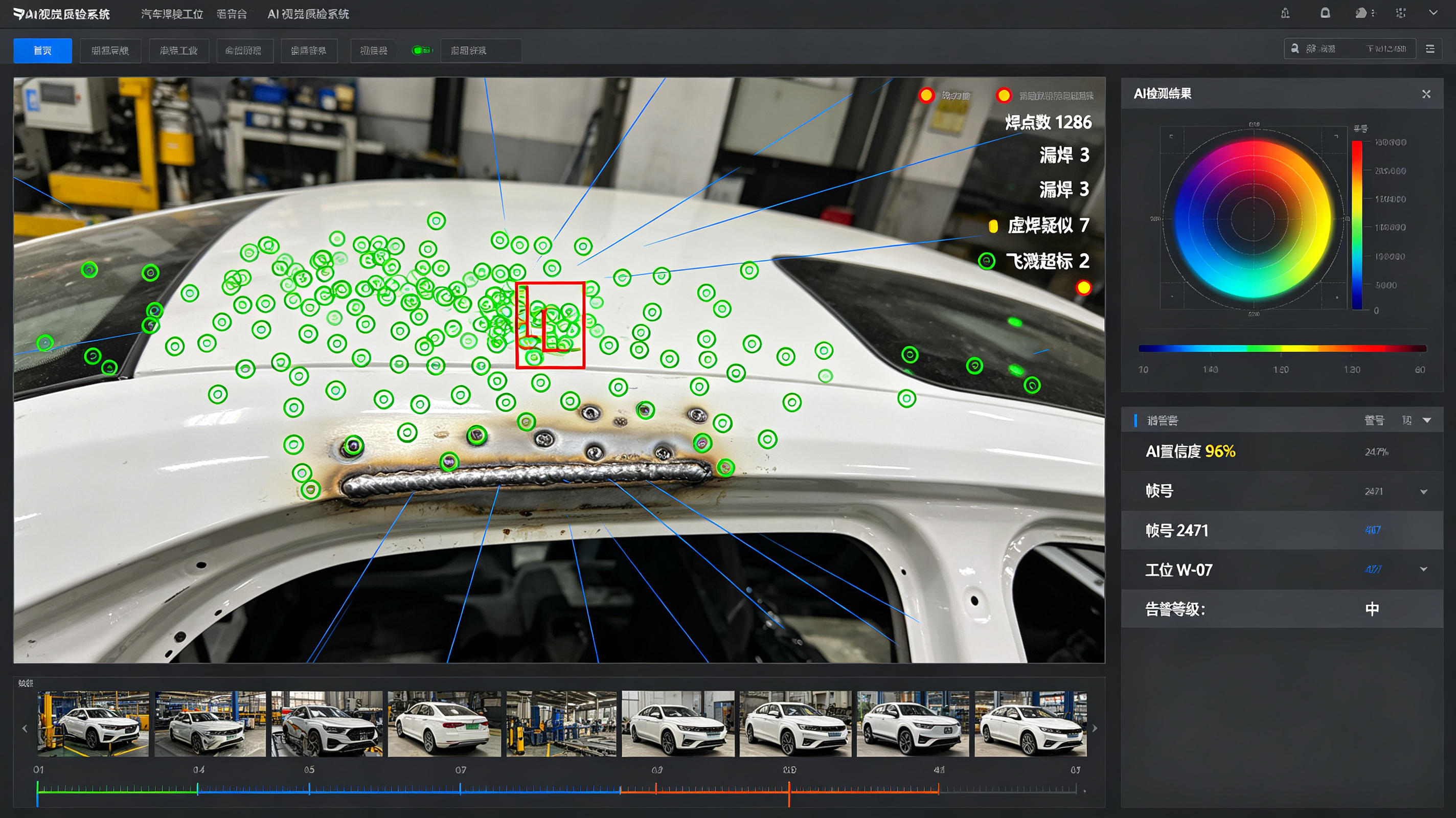
Service Demo Video
AI Visual Inspection System
1. Preface
1.1 Document Purpose
This document is the user manual for the AI Visual Inspection System. It is intended to describe in detail all functional modules of the system, operating specifications, data storage mechanisms, parameter configuration, usage precautions, and fault handling procedures. It is designed to help operators, maintenance personnel, and management staff quickly master the system operation process, standardize inspection work standards, ensure stable equipment operation and secure retention of inspection data, and provide a complete guidance basis for intelligent factory inspection, quality traceability, and production optimization.
1.2 System Overview
The AI Visual Inspection System is an intelligent industrial quality inspection platform built on deep learning, machine vision, image algorithms, and real-time data transmission technologies. It can replace manual labor in performing appearance defect detection, dimensional accuracy verification, material compliance inspection, and workstation status monitoring for various industrial products. The system features high precision, high speed, iterability, and traceability, and is adaptable to production lines in multiple industries, including electronics manufacturing, metal processing, plastics production, food packaging, and automotive components. The system supports dual-mode data storage and can flexibly switch between local storage and third-party cloud storage in the country of operation according to factory compliance requirements and data security needs, fully accommodating enterprise localization and cloud deployment requirements.
1.3 Scope of Application
This manual applies to all factory operators, equipment maintenance personnel, quality management personnel, and system administrators who use, maintain, or manage the AI Visual Inspection System. It may also serve as a reference for system deployment, commissioning, and upgrade.
2. Overall System Functional Architecture
The system is composed of seven core functional modules: the Image Acquisition Module, the AI Intelligent Inspection Module, the Real-Time Monitoring and Early Warning Module, the Data Storage Management Module, the Data Statistics and Analysis Module, the Equipment Operation and Maintenance Management Module, and the System Permission Management Module. The modules work in coordination to achieve fully automated operations across the entire workflow, from image acquisition, intelligent inspection, result output, data retention, and data analysis to equipment control. Among them, the Data Storage Module supports free switching between local storage and third-party cloud storage in the country of operation, a core featured function of the system.
3. System Function Description
3.1 Image Acquisition Module
Image acquisition is the foundational module of the system's inspection operations. It is responsible for capturing high-definition images of products on the production line in real time to provide raw data for AI algorithm inspection, and supports multi-device adaptation and customized parameter adjustment for various scenarios.
3.1.1 Multi-Device Adaptive Acquisition
The system is compatible with various industrial vision acquisition devices, including industrial high-definition cameras, high-speed frame cameras, infrared cameras, and macro cameras. It supports single-camera single-point acquisition and multi-camera synchronized stitching acquisition, and can accommodate the image acquisition needs of different inspection targets such as flat products, three-dimensional irregular products, and tiny precision components, meeting the requirements of different operation scenarios including high-speed production lines and static inspection workstations.
3.1.2 Customized Acquisition Parameter Configuration
Operators can customize image acquisition parameters in the system backend, including resolution, frame rate, exposure, white balance, contrast, focal length, and fill-light mode. For production line scenarios with reflections, low light, strong light, or severe vibration, dedicated acquisition parameter templates can be preset and invoked with one click, ensuring that acquired images are clear, undistorted, and noise-free and safeguarding inspection accuracy at the source.
3.1.3 Automatic Capture and Trigger-Based Acquisition
Multiple acquisition trigger modes are supported: automatic triggering by photoelectric sensors on the production line, timed continuous capture, manual button capture, and barcode-scan-linked triggering. Once a product reaches the inspection workstation, the system automatically completes image acquisition without manual intervention, adapting to uninterrupted automated production line operations and eliminating missed or erroneous captures.
3.2 Core AI Intelligent Inspection Module
As the core function of the system, this module relies on deep learning algorithm models to perform intelligent analysis of acquired product images, accurately identifying various defects and nonconforming items. It supports custom model training and iterative upgrades.
3.2.1 Full-Category Intelligent Defect Detection
The system can accurately identify common and subtle defects in industrial products, covering full-dimensional inspection of appearance, dimensions, assembly, stains, and damage. Appearance defects include scratches, cracks, paint peeling, deformation, bumps and dents, bubbles, and impurities; dimensional defects include length deviations, aperture diameter deviations, spacing beyond tolerance, angular errors, and misaligned edges; assembly defects include missing parts, wrong assembly, omitted installation, loosening, and misalignment; other defects include stains, wear, blurred characters, damaged packaging, and missing markings. Inspection accuracy can reach up to 99.9%.
3.2.2 High-Precision Automatic Dimension Measurement
The system supports non-contact visual precision measurement and can automatically detect geometric parameters such as product length, width, height, aperture diameter, center-to-center distance, curvature, and flatness, automatically comparing them against product standard parameter thresholds to determine whether product dimensions are qualified. Measurement data is generated in real time with an accuracy of up to 0.01 mm, far exceeding manual inspection accuracy, and is suitable for precision component inspection scenarios.
3.2.3 Custom Model Training and Iteration
The system features a built-in AI model training platform. Management staff can upload sample images for model training based on new products and new defect types at the factory. It supports rapid iteration with small sample sets, customizable defect labeling, and flexible adjustment of inspection thresholds. Trained models can be deployed online with one click without requiring professional algorithm personnel, adapting to the inspection needs of factory product iteration and process updates. The system also supports model version management, allowing model versions to be rolled back or upgraded at any time.
3.2.4 Real-Time Inspection Result Determination
After image acquisition, the system completes algorithm analysis within milliseconds and automatically outputs inspection results in three determination states: Qualified, Unqualified, and Pending. For unqualified products, the system automatically marks the defect location, defect type, and defect level; products that cannot be determined due to blurred or occluded images are marked as Pending and flagged for manual re-inspection, avoiding false positives and missed detections.
3.3 Real-Time Monitoring and Early Warning Module
This module enables visualized monitoring of the inspection process, real-time abnormal early warning, and linked production line control, ensuring orderly inspection operations and timely interception of defective products.
3.3.1 Visualized Real-Time Monitoring
The system main interface supports synchronized display of real-time images from multiple workstations, allowing real-time viewing of inspection images on each production line, product inspection status, and real-time pass rates. It supports image enlargement, screenshots, recording, and full-screen viewing of a single workstation. Management staff can monitor the entire inspection process remotely or on site at any time, keeping abreast of the production line quality status in real time.
3.3.2 Multi-Level Abnormal Early Warning and Notification
The system supports customized early warning rules, providing multi-level warnings for issues such as excessive defective products, equipment abnormalities, image acquisition failures, model inspection anomalies, and production line jams. Warning methods include pop-up interface alerts, equipment buzzer alarms, SMS notifications, and backend message pushes. Warning thresholds can be customized; for example, a defect rate exceeding 5% within a single hour automatically triggers a warning, promptly reminding staff to investigate production issues.
3.3.3 Production Line Linked Rejection
The system supports integration with production line conveying equipment and sorting equipment. Upon detecting an unqualified product, the system automatically issues commands to stop the production line and have the sorting mechanism automatically reject the defective product, preventing defective products from flowing into the next process and achieving integrated automated inspection and rejection operations. Manual release of the linkage is also supported to accommodate manual re-inspection scenarios.
3.4 Dual-Mode Data Storage Management Module (Core Featured Function)
The system supports two storage modes: in-plant local storage and third-party cloud storage in the country where the factory is located. It supports independent use of a single mode and synchronized backup using both modes. Users can freely configure storage according to enterprise data compliance requirements, storage needs, and network environment. All inspection data, image data, equipment logs, and analysis reports can be fully retained.
3.4.1 In-Plant Local Storage Mode
This mode is an on-premises (privatized) deployment storage solution. All system data is stored in local storage devices such as in-plant servers, local hard drives, and disk arrays. Data is not transmitted externally and remains fully under the control of the factory intranet, making it suitable for enterprises with high data confidentiality requirements or prohibitions on data leaving the premises.
- Stored content: includes all system data, such as original inspection images of all products, defect-marked images, inspection parameter data, inspection result records, equipment operation logs, operation logs, statistical reports, model files, and early warning records.
- Core features: data localization, no external network transmission risk, extremely high security, and immunity to network fluctuations; the system can operate normally and retain data as usual even when disconnected from the network; supports periodic local data backup, manual backup, and automatic overwriting of expired data, with a customizable data retention period (configurable from 7 days to 10 years).
- Applicable scenarios: production of confidential products, production of high-precision precision components, enterprises with data localization compliance requirements, and production scenarios with unstable factory network conditions.
3.4.2 Third-Party Cloud Storage Mode in the Host Country
This mode is a compliant cloud storage solution. The system encrypts and uploads various types of inspection data to compliant third-party cloud servers within the country where the factory is located. Data remains entirely within the host country throughout its lifecycle, strictly complying with local data security regulations and eliminating cross-border data transmission risks.
- Stored content: identical to local storage, covering full-volume data including image data, inspection results, equipment logs, report data, operation records, and early warning information; supports selective cloud storage, allowing inspection reports and key defect data to be uploaded separately to save cloud storage space.
- Core features: strong compliance, fully compliant with the host country's data storage and privacy protection regulations; off-site backup of data in the cloud avoids data loss caused by local hardware damage; supports remote data retrieval and cross-terminal data viewing; cloud data is automatically encrypted and stored with periodic snapshot backups, offering higher data security and durability.
- Applicable scenarios: production scenarios where enterprises require remote operation and maintenance, multi-facility data aggregation management, off-site data backup, or compliance with industry cloud-based traceability requirements.
3.4.3 Storage Mode Switching and Synchronization Configuration
- Free mode switching: system administrators can switch between local storage and cloud storage with one click on the backend storage settings interface. The operation is simple and requires no shutdown or restart, without affecting normal production line operations.
- Dual-mode synchronized backup: local and cloud dual storage can be enabled simultaneously, with real-time two-way data retention, balancing local data confidentiality and cloud data backup security.
- Customizable storage policies: differentiated storage rules can be configured, such as storing high-definition original images locally only while synchronizing inspection reports and statistical data to the cloud, precisely matching enterprise storage costs and data security requirements.
- Offline resumable upload: in cloud storage mode, if the factory's external network is interrupted, the system automatically stores data locally and automatically synchronizes it to the cloud in batches once the network is restored, with no data loss and no duplicate uploads.
3.4.4 Data Encryption and Security Management
Both storage modes support end-to-end data encryption. Local storage uses intranet encryption protocols and hard drive encryption protection to prevent local data theft and tampering; cloud storage uses encryption algorithms compliant with host-country regulations, with full encryption throughout data transmission, storage, and retrieval. The third-party cloud platform provides storage services only and has no right to view or use the data, safeguarding enterprise data privacy and security. In addition, the system automatically records logs of all data retrieval, export, and deletion operations, ensuring full traceability.
3.5 Data Statistics and Analysis Module
The system automatically aggregates all inspection data, performs intelligent statistical analysis, and generates visualized reports, providing data support for production optimization, quality control, and process improvement.
3.5.1 Real-Time Data Statistics
Real-time statistics are generated for core data such as total production output, number of qualified products, number of unqualified products, number of pending products, real-time pass rate, and defect rate. Data is updated within seconds, allowing real-time viewing of inspection data by workstation, product, and time period.
3.5.2 Defect Data Analysis
The system automatically classifies and counts the occurrence frequency, proportion, peak time periods, and peak workstations of various defects, generating defect distribution pie charts, trend line charts, and ranking bar charts. It precisely identifies production process problems, equipment failures, and raw material issues, assisting technical staff in optimizing production processes in a targeted manner.
3.5.3 Custom Report Generation and Export
Custom inspection reports can be generated by hour, day, week, month, quarter, and year, containing complete information including production data, defect data, equipment operation data, and early warning records. Reports can be exported in multiple formats such as Excel, PDF, and images, and can be saved locally or archived in the cloud, facilitating quality review, reconciliation and audit, and compliance reporting.
3.5.4 Data Traceability Query
Multi-dimensional precise traceability is supported. The original inspection images, inspection results, operating personnel, and equipment operation status of corresponding products can be queried with one click by conditions such as product batch, production time, workstation number, product barcode, and defect type, enabling full-lifecycle quality traceability of products.
3.6 Equipment Operation and Maintenance Management Module
The system manages all associated visual inspection equipment in real time, providing equipment status monitoring, fault self-diagnosis, and maintenance record management to ensure long-term stable equipment operation.
3.6.1 Real-Time Equipment Status Monitoring
The system monitors the operating status of industrial cameras, light sources, transmission equipment, servers, and storage devices in real time, including parameters such as equipment online status, operating temperature, frame rate, transmission rate, and storage space utilization, with real-time early warning for abnormal conditions.
3.6.2 Automatic Fault Self-Diagnosis and Repair
The system features automatic equipment fault detection, capable of identifying issues such as camera offline, light source failure, image transmission anomalies, storage disk failures, and algorithm model anomalies. Some routine faults can be repaired automatically, such as restarting the image acquisition program and resetting transmission channels, reducing manual maintenance costs.
3.6.3 Operation and Maintenance Log Management
All maintenance operations, including equipment power-on, power-off, faults, repairs, parameter adjustments, and model upgrades, are automatically recorded to generate complete operation and maintenance logs. Log query, export, and retention are supported, providing a basis for equipment maintenance, fault review, and equipment iteration. Customized equipment maintenance reminders are also supported, periodically reminding staff to complete equipment cleaning, calibration, and maintenance.
3.7 System Permission and Security Management Module
Through tiered permission control, the module standardizes system operation processes, prevents misoperation, data tampering, and data leakage, and ensures system and data security.
3.7.1 Multi-Level Account Permission Management
The system supports four levels of account permissions: Super Administrator, Operation and Maintenance Administrator, Quality Administrator, and General Operator. Different accounts correspond to different operation permissions: operators can only view real-time images, view inspection results, and manually trigger re-inspection; quality administrators can query data, export reports, and view defect analysis; operation and maintenance administrators can debug equipment, configure parameters, and manage storage modes; the super administrator has all permissions and can create, delete, and modify account permissions.
3.7.2 Full-Process Operation Logging
The system automatically records all behaviors of every account, including logins, operations, parameter modifications, data exports, report deletions, and storage mode switching. Logs are tamper-proof and permanently retained, support query and traceability at any time, and help regulate personnel behavior.
3.7.3 System Security Protection
The system supports encrypted account password login, IP login restrictions, remote login early warning, and automatic logout upon operation timeout, preventing unauthorized login and malicious operations. Backend parameters, model files, and storage configurations all require administrator permission to unlock, preventing arbitrary modification.
4. Basic System Operation Procedures
4.1 System Startup and Login
- Turn on the equipment power, start the server and the inspection system, and wait for the system to complete automatic initialization.
- Log in to the system with the dedicated account and password; the corresponding operation interface is displayed according to account permissions.
- After login, the system automatically checks the equipment connection status and storage mode status; operations can commence once no abnormalities are confirmed.
4.2 Storage Mode Configuration
- The super administrator logs in to the backend and enters the [Storage Management] configuration interface.
- Select the storage mode as needed: check “Local Storage” or “Cloud Storage”; both options can be checked simultaneously to enable dual-mode synchronized storage.
- Configure storage parameters: set the data retention period, automatic backup frequency, cloud synchronization rules, and expired data cleanup rules.
- Save the configuration; the system takes effect immediately without requiring a device restart.
4.3 Daily Quality Inspection Operations
- The operator logs in to the system, turns on the real-time monitoring screen, and confirms that image acquisition is normal.
- Invoke the inspection model and parameter template corresponding to the product, and start the automatic inspection mode.
- The system automatically completes the full workflow of acquisition, inspection, determination, data retention, and defective product rejection.
- For pending products and abnormal warnings, manual intervention is performed for re-inspection and handling, and the handling results are recorded.
4.4 Data Query and Report Export
- Enter the [Data Center] interface and select the query dimension (time, batch, workstation, or defect type).
- Filter the required data; the system automatically generates statistical charts and reports.
- Select the export format; data can be saved locally or synchronized to the cloud for archiving.
5. Data Storage Maintenance Specifications
5.1 Local Storage Maintenance
- Regularly check the storage space of local servers and disk arrays; promptly clean up expired data or expand hardware when storage space is insufficient.
- Perform a full data backup manually once a month to prevent data loss caused by hardware failures.
- Do not arbitrarily plug or unplug storage hardware or modify local storage folder paths, to avoid data corruption and loss.
5.2 Cloud Storage Maintenance
- Regularly check the stability of the factory's external network to ensure normal data synchronization.
- Log in to the cloud backend to check storage capacity and expand cloud storage space as needed.
- Strictly prohibit unauthorized modification of cloud encryption keys and storage permissions to safeguard cloud data security.
6. Common Faults and Troubleshooting
Table 1 Common Faults and Troubleshooting
Common Fault Symptom | Fault Cause | Troubleshooting |
Blurred or noisy image acquisition | Abnormal acquisition parameters, lens contamination, light source failure | Clean the camera lens, reset the acquisition parameter template, and inspect or replace the light source equipment |
Cloud data synchronization failure | External network interruption, expired cloud permissions, incorrect encryption key | Check the network connection and re-verify cloud permissions and the encryption key; data accumulated during the outage will be uploaded automatically |
Insufficient local storage space | Expired data not cleaned up, storage capacity saturated | Manually clean up expired redundant data, or expand local storage hardware |
Rising false-positive and missed-detection rates | Aging AI model, unreasonable parameter thresholds | Retrain and optimize the AI model, and adjust inspection determination thresholds |
Equipment offline, black monitoring screen | Equipment power loss, loose cables, transmission fault | Check the equipment power supply and cable connections, and restart the acquisition equipment and the system |
Spécifications
Caractéristiques
- 1. Multi-scenario Intelligent Quality Inspection Capability: Leveraging deep learning, machine vision and other technologies, the system automatically performs product appearance defect detection, dimension verification, material validation and workstation monitoring. It replaces manual quality inspection and adapts to production lines in multiple industries such as electronics, hardware, plastics and auto parts, featuring high detection accuracy and fast speed, with iteratively upgradable algorithms.
- 2. Dual-mode Flexible Data Storage: Supports two solutions including local storage and third-party cloud storage. Enterprises can freely switch between them in accordance with compliance and data security requirements, meeting the needs of both on-premises and cloud deployment while ensuring secure retention of quality inspection data.
- 3. Full-process Standardized Support System: Equipped with complete operating specifications, parameter configurations and troubleshooting solutions. Targeting operators, maintenance personnel and managers, it unifies quality inspection standards and supports quality traceability and production optimization.
- 4. Industrial Platform Usable for All Roles: Documentation covers all functional modules and maintenance details to help staff in different positions get started quickly. It ensures stable operation of production line equipment and provides complete guidance for intelligent quality inspection in factories.